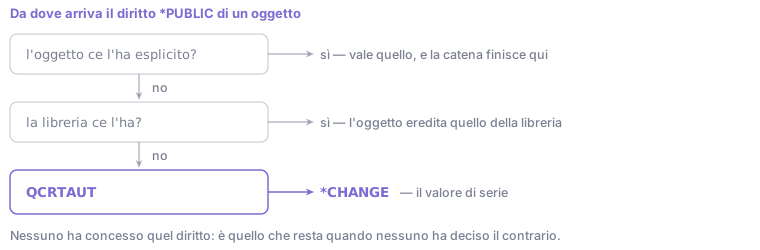
The *PUBLIC authority of an object, if not set explicitly, is inherited from the library and
ultimately from the QCRTAUT system value, whose default is *CHANGE.
The consequence is that on a system never reviewed, public authority is typically wider than follows from any documented decision. The perimeter was not widened: it was never narrowed.
This perimeter is independent of menu security, which constrains 5250 interactive access and not the interfaces reaching the database directly, which can be acted on from the exit points.
Photographing the situation
The view is QSYS2.OBJECT_PRIVILEGES, returning one row for every user authorized to an
object: the same information as DSPOBJAUT, in queryable form.
The distribution by library, to be run first because it is aggregated and returns few rows:
SELECT OBJECT_AUTHORITY, COUNT(*) AS HOW_MANY
  FROM QSYS2.OBJECT_PRIVILEGES
 WHERE SYSTEM_OBJECT_SCHEMA = 'PRODLIB'
   AND AUTHORIZATION_NAME = '*PUBLIC'
 GROUP BY OBJECT_AUTHORITY
 ORDER BY HOW_MANY DESC;
The list of non-excluded objects, to be run after seeing the numbers:
SELECT SYSTEM_OBJECT_NAME, OBJECT_TYPE, OBJECT_AUTHORITY
  FROM QSYS2.OBJECT_PRIVILEGES
 WHERE SYSTEM_OBJECT_SCHEMA = 'PRODLIB'
   AND AUTHORIZATION_NAME = '*PUBLIC'
   AND OBJECT_AUTHORITY <> '*EXCLUDE'
 ORDER BY SYSTEM_OBJECT_NAME;
Measuring real usage
Authority granted does not indicate authority used. Without that data every restriction is a hypothesis, and verification takes place in production.
Authority collection records every authority check actually performed, with the authority required and the one that would have been sufficient. It is enabled per profile:
STRAUTCOL TYPE(*USRPRF) USRPRF(MARIO) LIBINF((PRODLIB))
It is stopped with ENDAUTCOL. IBM notes that collection applies to the thread's effective
user profile, and that nothing is collected for a profile used as a group. It should stay active for a full work cycle including periodic processing: a period-end close
uses objects that are not opened during the rest of the month. Then:
SELECT SYSTEM_OBJECT_SCHEMA, SYSTEM_OBJECT_NAME, OBJECT_TYPE,
       CURRENT_AUTHORITY, REQUIRED_AUTHORITY
  FROM QSYS2.AUTHORITY_COLLECTION
 WHERE AUTHORIZATION_NAME = 'MARIO';
CURRENT_AUTHORITY is the authority the profile held at that moment, REQUIRED_AUTHORITY
the minimum the operation would have needed. Side by side they quantify the restriction margin
on a documented basis.
Reading it requires elevated authority. The view needs
*ALLOBJand*SECADM, or usage authority for theQIBM_DB_SECADMfunction. Without it, it answers[SQL0443] *ALLOBJ AND *SECADM AUTHORITY, OR QIBM_DB_SECADM FUNCTION USAGE IS REQUIRED: an authority error, not a syntax error and not a missing object.
Example: reading the restriction margin
The values below are illustrative, shown to convey how the comparison is read.
Public authority distribution over a library, from the first query:
OBJECT_AUTHORITY   HOW_MANY
*CHANGE                 418
*USE                     36
*EXCLUDE                  7
Four hundred and eighteen objects modifiable by anyone. On its own the figure does not say how many need to be.
After a month of collection over the same scope:
SYSTEM_OBJECT_NAME  OBJECT_TYPE  CURRENT_AUTHORITY  REQUIRED_AUTHORITY
ARTICOLI            *FILE        *CHANGE            *USE
CLIENTI             *FILE        *CHANGE            *USE
MOVMAG              *FILE        *CHANGE            *CHANGE
LISTINI             *FILE        *CHANGE            *USE
Of the four tables the profile actually used, three require only *USE: read access. Only
one writes. Public *CHANGE authority on ARTICOLI, CLIENTI and LISTINI exceeds observed
usage and can drop to *USE without affecting any observed operation.
Objects that do not appear at all in the collection are the second useful piece of information: during the observed period that profile did not open them. It is not proof they are never needed (an annual program does not appear within a month) but it narrows the analysis to a far shorter list than the starting one.
Order of intervention
Library default authority first. CHGLIB ... CRTAUT(...) changes the authority objects
created in the library from then on will get, and leaves existing ones alone: it stops the
perimeter widening further. It is not done by changing QCRTAUT: IBM warns that several
system libraries, QSYS included, have CRTAUT(*SYSVAL), and that a value other than *CHANGE
can stop sign-on at new or automatically created devices.
Then objects with qualified content. Payroll, personal data, accounting. A narrow set of objects handled correctly is worth more than a broad intervention conducted without usage data.
Authorization lists instead of individual authorities. An object attached to a list is administered by changing the list; a large set of individual authorities is not administrable in a verifiable way.
Adopted authority (USRPRF(*OWNER)) for operations requiring more authority than the user
holds. It is the intended mechanism for avoiding a widening of the object's public authority.
The precondition: security level
The above assumes QSECURITY at 40 or 50. At level 30 authority checking is there, but
according to IBM's table of levels a program accessing objects through unsupported interfaces
succeeds: auditing records an AF entry without blocking it. From 40 the operation fails.
Since IBM i 7.5 level 20 can no longer be set: systems already there retain it after an upgrade, but it is no longer a reachable value.
Which versions this works on
QSYS2.OBJECT_PRIVILEGES has been available for several releases.
Authority collection for users arrived
with IBM i 7.3; collection for objects (STRAUTCOL TYPE(*OBJAUTCOL), with the
AUTHORITY_COLLECTION_LIBRARIES view and its siblings) is in the 7.5 documentation. QCRTAUT, authorization lists and adopted authority have no release
constraints.
Comments
No comments yet. Be the first to comment!
You need an account to comment. Log in · Sign up